
Article Summary
- FortiEndpoint is Fortinet’s unified endpoint agent that merges FortiClient (VPN, ZTNA, web filtering) and FortiEDR (behavior-based threat detection, automated response) into a single agent with one console and one policy engine.
- Organizations running FortiClient and FortiEDR as separate agents deal with duplicate licensing, agent conflicts, higher endpoint resource overhead, and fragmented visibility during incident response, exactly the blind spots FortiEndpoint is built to close.
- FortiEndpoint is not a new product built from scratch. It’s built on Fortinet’s existing Security Fabric integration, and for most organizations already running FortiClient EMS and FortiEDR, migration is a phased consolidation rather than a rip-and-replace deployment.
Still Running FortiClient and FortiEDR Separately?
If your organization deployed FortiClient for VPN and Zero Trust Network Access, then bolted on FortiEDR later for threat detection, you’re not alone, and you’re not necessarily doing anything wrong. That’s how most Fortinet endpoint security stacks got built. But running two separate agents, two consoles, and two policy engines has a real cost, one that shows up most clearly during an incident, when your team is trying to piece together a complete picture of what happened across tools that were never designed to share context.
FortiEndpoint changes that. Here’s what the two products actually do separately, where the gaps show up when they’re run apart, and what consolidating into a single agent actually looks like.
What FortiClient and FortiEDR Each Handle Today
FortiClient and FortiEDR were built to solve different problems, and understanding that split is the first step to seeing where the overlap, and the gap, actually sits.
FortiClient Handles Connectivity and Compliance
- VPN connectivity
- Zero Trust Network Access
- Web filtering
- Vulnerability scanning
- Application firewall
- Endpoint compliance checks
In short, FortiClient governs how a device connects and whether it’s allowed to, checking that the endpoint meets policy before granting access to the network.
FortiEDR Handles Detection and Response
- Behavior-based threat detection
- Automated threat response and containment
- Ransomware protection
- Forensic investigation and incident logging
- Post-breach analysis and reporting
FortiEDR governs what happens once something goes wrong on that endpoint, detecting abnormal behavior and containing it before it spreads.
Learn more about Zero Trust Network Access.
The Real Cost of Running Two Separate Agents
When FortiClient and FortiEDR are deployed as genuinely separate agents, the cost isn’t just licensing. It shows up operationally, every day, in ways that are easy to normalize until you see them laid out together.
Two Consoles, Two Policy Engines, Two Licensing Tracks
Your team manages connectivity policy in one console and detection policy in another. Changes to one don’t automatically inform the other, which means keeping both in sync becomes a manual, ongoing task rather than something the platform handles for you.
Agent Conflicts and Endpoint Resource Overhead
Running two separate security agents on the same endpoint means two sets of processes competing for the same system resources, and in some environments, genuine conflicts between how each agent hooks into the operating system. That overhead is invisible until it isn’t, usually surfacing as endpoint performance complaints that are hard to trace back to the actual cause.
Fragmented Visibility During Incident Response
This is where the cost becomes most serious. Fragmented endpoint security creates blind spots: your connectivity logs live in one system, your detection and forensic data live in another, and correlating them during an active incident means manually cross-referencing two tools instead of working from a single, unified timeline. Unifying FortiClient and FortiEDR closes that gap directly, giving your SOC one place to see the full picture, from how a device connected to what happened on it, without switching consoles mid-investigation.
Where FortiClient and FortiEDR Overlap
Both products touch endpoint protection, but from different angles, which is exactly why organizations often assume one covers the other’s job when it doesn’t. FortiClient’s compliance checks confirm an endpoint meets policy before connecting. FortiEDR’s behavior-based detection confirms nothing malicious is happening on that endpoint after it’s already connected. An organization running only FortiClient can verify a device is compliant at the door but has no visibility into behavior once it’s inside. An organization running only FortiEDR gets strong detection but lacks the connectivity-layer enforcement FortiClient provides. That blind spot, thinking one tool’s coverage extends into the other’s territory, is one of the most common gaps we see in Fortinet endpoint deployments.
What FortiEndpoint Is
FortiEndpoint is Fortinet’s unified agent bringing FortiClient and FortiEDR together, not a new product built from scratch. It’s built on Fortinet’s existing Security Fabric integration, converging secure connectivity, endpoint protection, and advanced detection and response capabilities into a single agent.
In practice, that means a single console, a single policy engine, and a single deployment across your endpoint fleet, replacing the two-console, two-policy-engine model most organizations are running today.
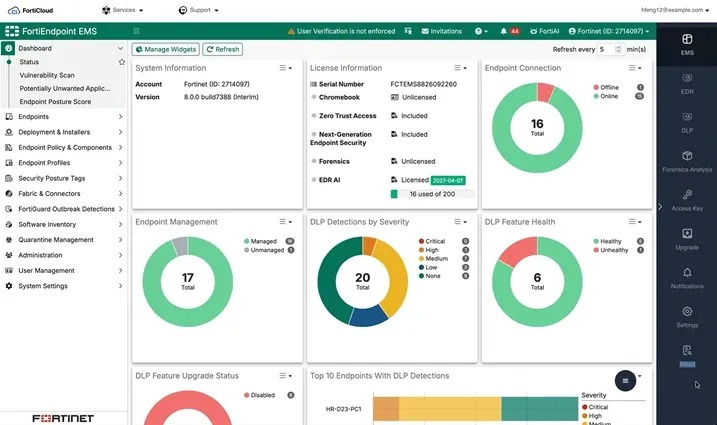
FortiEndpoint EMS dashboard
What You Gain Beyond Consolidation
The most immediate operational benefit is a reduced attack surface from fewer agents running per endpoint. Every additional agent on a device is an additional attack surface and additional software that has to be patched, monitored, and maintained. Consolidating connectivity and detection into one agent means one less thing to secure and one less potential point of failure, on top of the visibility and management benefits.
Explore Liquid Networx’s Security Operations Platform.
What Migration to FortiEndpoint Looks Like
For organizations already running FortiClient EMS and FortiEDR, migrating to FortiEndpoint is a phased consolidation, not a rebuild. Fortinet’s approach integrates the FortiEDR collector into the FortiClient unified installer, so the EDR agent can be installed alongside FortiClient rather than as a completely separate deployment. EDR collector groups are created and managed within EMS, and are synced with the EDR Management System, meaning endpoints assigned to an EMS deployment are automatically assigned to their corresponding EDR collector group.
Does Existing FortiEDR Policy Configuration Carry Over
Because the migration integrates the EDR collector into the existing FortiClient installer rather than replacing FortiEDR outright, organizations should expect to review, rather than rebuild, existing detection policy during migration. Confirming exactly how existing policy configurations map into the unified environment is a key step in planning your specific migration, since this can vary depending on your current FortiEDR deployment and version.
Licensing True-Up Considerations
Consolidating from two separate licensing tracks into a unified platform is an opportunity to true up your licensing to match actual deployed endpoint counts, particularly if your FortiClient and FortiEDR licenses were purchased at different times and may no longer reflect the same endpoint population.
Recommended Rollout Approach
A phased rollout, starting with a pilot group of endpoints before expanding fleet-wide, is the recommended path for most organizations, allowing your team to validate that policy behavior, detection sensitivity, and connectivity rules all carry over as expected before committing to a full migration.
People Always Ask
Is FortiEndpoint a new product, or does it replace FortiClient and FortiEDR?
FortiEndpoint is not a new product built from scratch. It’s a unified agent that brings FortiClient and FortiEDR together, built on Fortinet’s existing Security Fabric integration. Organizations already running FortiClient and FortiEDR migrate into FortiEndpoint rather than replacing both products outright.
Do I need to buy FortiEndpoint separately if I already have FortiClient and FortiEDR?
Migration is a licensing true-up and consolidation process rather than a net-new purchase. Since the FortiEDR collector integrates into the existing FortiClient installer, organizations should work with their Fortinet partner to confirm how current licenses map into the unified platform.
Will my existing FortiEDR detection policies carry over to FortiEndpoint?
Because the migration integrates the FortiEDR collector into the existing FortiClient deployment rather than rebuilding detection from scratch, most existing policy configurations carry forward. Reviewing that configuration during migration, rather than assuming a 1:1 carryover, is the recommended approach.
What is the main benefit of consolidating FortiClient and FortiEDR into one agent?
The most immediate benefits are unified visibility during incident response, since connectivity and detection data live in one console instead of two, and a reduced attack surface from running fewer agents per endpoint. Consolidation also removes the overhead of managing two separate policy engines and licensing tracks.
How long does a FortiClient to FortiEndpoint migration take?
Timelines vary by environment size and complexity, but Fortinet’s recommended approach is a phased rollout, starting with a pilot group of endpoints before expanding fleet-wide, rather than a single fleet-wide cutover. A partner like Liquid Networx can help scope a realistic timeline based on your current deployment.
Is It Time to Consolidate?
If your organization is running FortiClient and FortiEDR as separate agents today, dealing with two consoles, duplicate licensing overhead, or blind spots during incident response, FortiEndpoint is worth evaluating now rather than waiting for the next major refresh cycle. The migration path is designed to build on what you already have, not replace it.
Liquid Networx helps organizations plan and execute FortiClient to FortiEndpoint migrations, from policy review through phased rollout, so your team gets the consolidation benefits without disrupting existing protection.
Learn more about FortiEndpoint.
Schedule a FortiEndpoint migration assessment with Liquid Networx.